A blank spreadsheet is rarely the hard part of media planning. The harder question is what to put into it: how much to allocate, which results to estimate and which assumptions deserve a second look. This walkthrough uses the free media plan generator to turn a short campaign brief into an editable Excel plan.
We tested the live tool on 12 October 2026 using a fictional residential property campaign. The budget is ₹1 lakh over 30 days, and the objective is enquiries. This is a worked planning example, not a client case study or evidence of real-estate advertising performance.
Open the media plan template alongside this guide. If CPC, CPM and CTR are unfamiliar, the CPM, CPC and CTR calculator can help you check the relationships before changing your assumptions.
What you will build
The output is a digital-only media plan with a suggested channel split, expected delivery and an Excel workbook containing two sheets: Media plan and Plan inputs. The second sheet holds editable assumptions that feed the report formulas. You do not need to write spreadsheet formulas to get the first version.
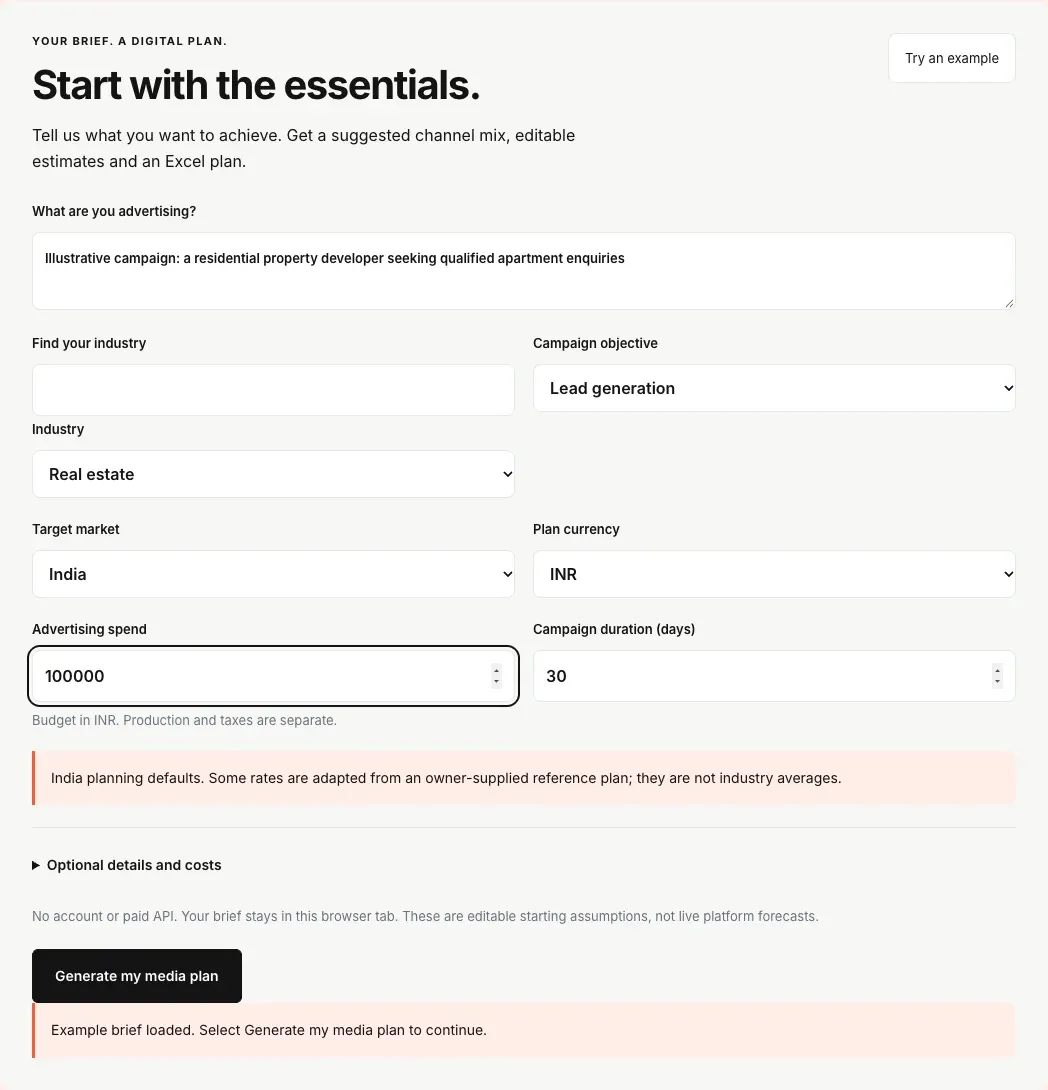
For this example, use: Real estate as the industry; Lead generation as the objective; India as the target market; INR as the currency; ₹100,000 as advertising spend; and 30 days as the duration. Leave production, taxes and additional audience details blank for the first pass. The entire ₹100,000 is available for advertising.
Step 1: enter a brief that defines the outcome
In “What are you advertising?”, describe the actual offer. Our example reads: “Illustrative campaign: a residential property developer seeking qualified apartment enquiries.” That is more useful to a colleague reviewing the plan than a campaign name alone. Avoid entering customer records, personal details or confidential campaign information into screenshots you intend to share.
Choose Real estate in Industry. On the version captured here, “Find your industry” is only a search aid for the industry dropdown; it is not a second industry choice. The industry is a label for the plan. Selecting Real estate does not load verified property-sector CPCs or conversion rates.
Choose Lead generation because we want enquiries. Branding produces delivery estimates such as impressions and clicks, while Sales uses purchase conversions and can incorporate an average order value. An enquiry is not a property sale, so a lead plan should not be presented as a sales forecast.
Step 2: set the market, currency, spend and duration
Set Target market to India and Plan currency to INR. These settings have different jobs: market determines the starting advertising assumptions, while currency determines how monetary amounts are expressed. Switching an Indian plan to USD does not turn it into a US campaign, and ₹65 should never simply become $65.
Enter 100000 for Advertising spend and 30 for Campaign duration. Production and taxes are optional extra amounts, rather than deductions from this media budget. If you add ₹10,000 production and ₹5,000 taxes later, media spend remains ₹100,000 and planned outlay becomes ₹115,000. No agency fee is included automatically.
The planner uses dated conversion references for supported currency pairs and asks for a rate when one is unavailable. Always review the displayed exchange-rate date. A currency conversion changes units; it does not establish the price of advertising in another country.
Step 3: generate and examine the channel split
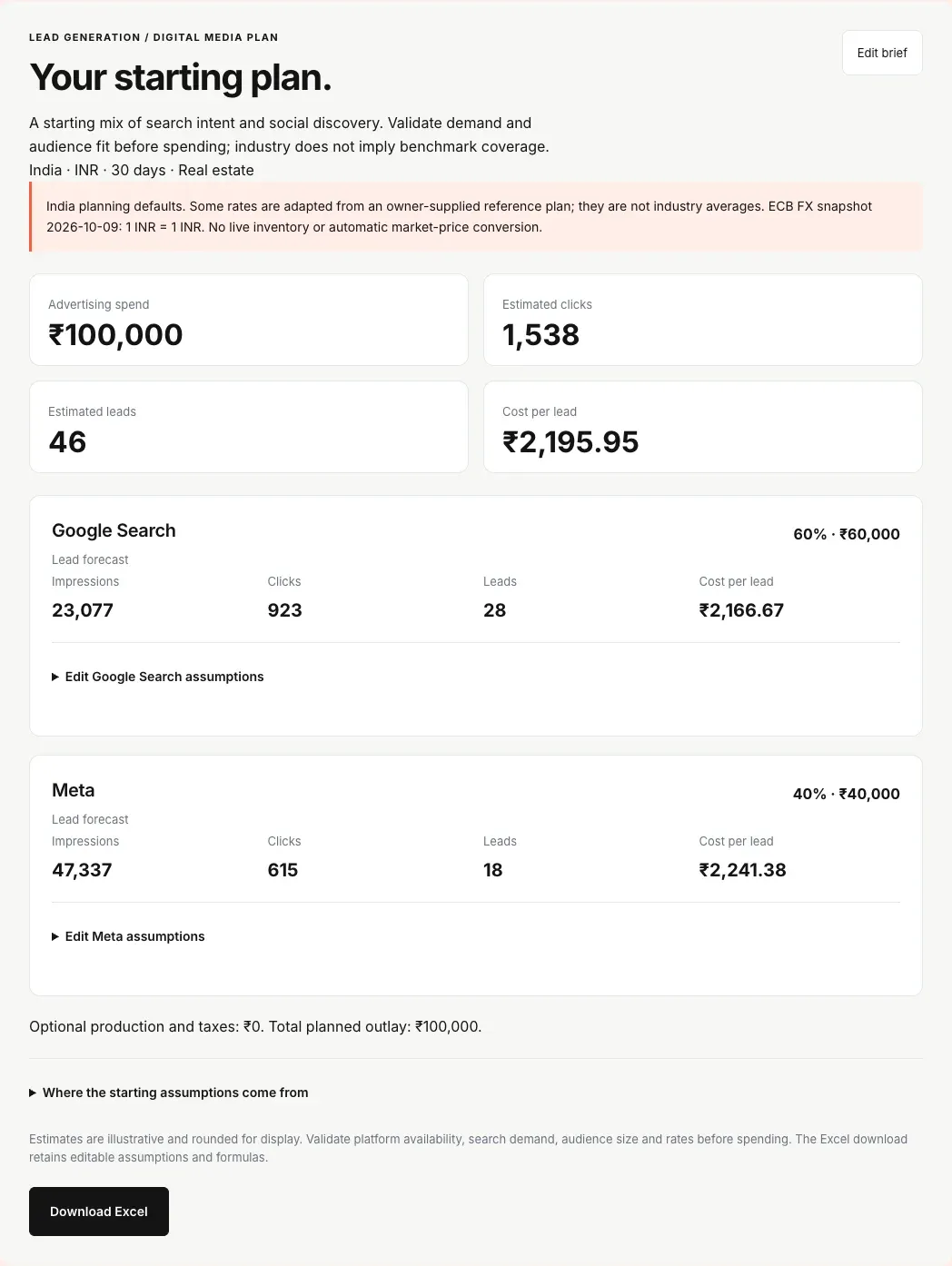
Select “Generate my media plan”. In this tested example, the tool allocates 60% to Google Search and 40% to Meta: ₹60,000 and ₹40,000 respectively. This is a starting allocation from the planner’s rules. It is not based on a live search-volume check, an advertising-account audit or an optimisation model trained on your campaign.
Our initial Google Search assumptions are ₹65 CPC, 4% link CTR and 3% click-to-lead conversion. Meta starts at ₹65 CPC, 1.3% link CTR and 2.9% click-to-lead conversion. Treat every one of these values as an assumption to review. The India Search values are illustrative; they are not verified real-estate benchmarks.
Step 4: understand the forecast before sharing it
For a CPC-based row, estimated clicks equal channel spend divided by CPC. Impressions equal clicks divided by CTR expressed as a decimal. Leads equal clicks multiplied by the click-to-lead conversion rate. Cost per lead equals channel spend divided by those expected leads.
Google Search: ₹60,000 ÷ ₹65 gives approximately 923.08 clicks. At 3% conversion, that is 27.69 expected leads and ₹2,166.67 per lead. With a 4% CTR assumption, the implied delivery is approximately 23,077 impressions. Meta: ₹40,000 ÷ ₹65 gives approximately 615.38 clicks, 17.85 expected leads at 2.9%, and ₹2,241.38 per lead.
Together, the initial plan estimates 1,538.46 clicks and 45.54 leads. The interface displays roughly 1,538 clicks and 46 leads, with a blended CPL of ₹2,195.95. The CPL uses the unrounded forecast, so dividing ₹100,000 by the displayed 46 will give a different number. Fractional leads describe an expected value; they are not a promise that a fractional person will submit a form.
Blended CPL must use total spend divided by total expected leads. Do not average the two channel CPLs without weighting them. Also, these are lead events, not verified unique buyers, qualified appointments or completed sales. Cross-platform duplication and lead quality need separate measurement.
Step 5: replace a starting assumption with your own evidence
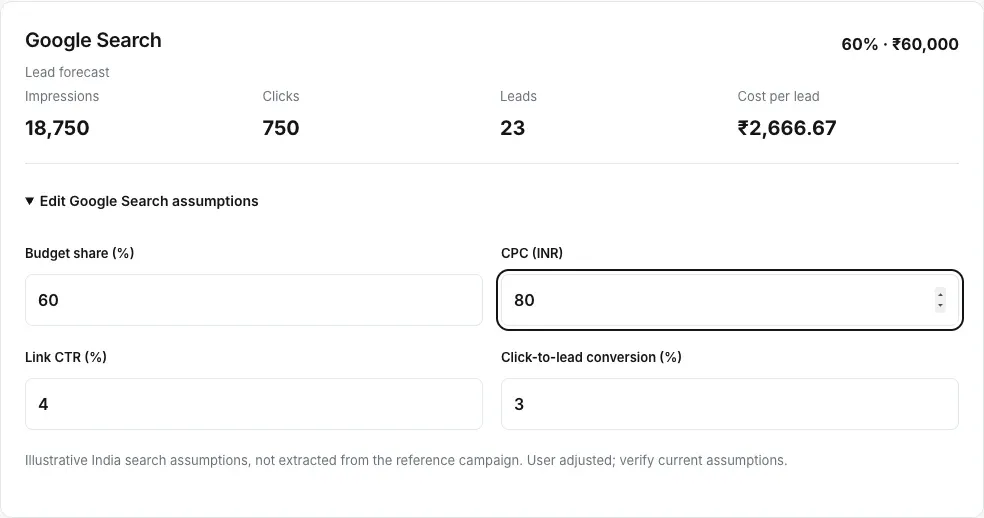
Expand “Edit Google Search assumptions” and change CPC from ₹65 to ₹80. Keep the Search allocation at ₹60,000, CTR at 4% and conversion at 3%. The row now estimates 750 clicks, 18,750 impressions and 22.5 leads, with a Search CPL of ₹2,666.67. The interface rounds the lead count to 23.